Checking your DL Status online is now much easier through the Government of India’s Sarathi Parivahan system. After applying for a Learner’s Licence or Driving Licence, applicants often want to know whether their application has been submitted successfully, whether documents have been verified, whether the driving test has been completed, or whether the licence has been issued.
The official Sarathi Parivahan platform provides online services related to driving licences, including application tracking and other licence-related facilities. The system is operated under the Ministry of Road Transport & Highways and is integrated with the national driving licence system.
What is DL Status?
DL Status refers to the current progress or record of your Driving Licence application. When you submit an application through the Sarathi Parivahan Portal, different stages may be recorded in the system.
For example, an application can move through stages such as application submission, document verification, appointment or test-related processing, approval by the concerned authority, and licence issuance.
The exact status displayed can vary depending on the service you applied for and the state or RTO handling your application.
The Sarathi system provides several driving licence services, including applying for a new Driving Licence, licence renewal, duplicate DL, change of address, DL services and other related facilities.
How to Check DL Status Online
You can easily check your Driving Licence application status online through the official Sarathi Parivahan portal. Follow these simple steps:
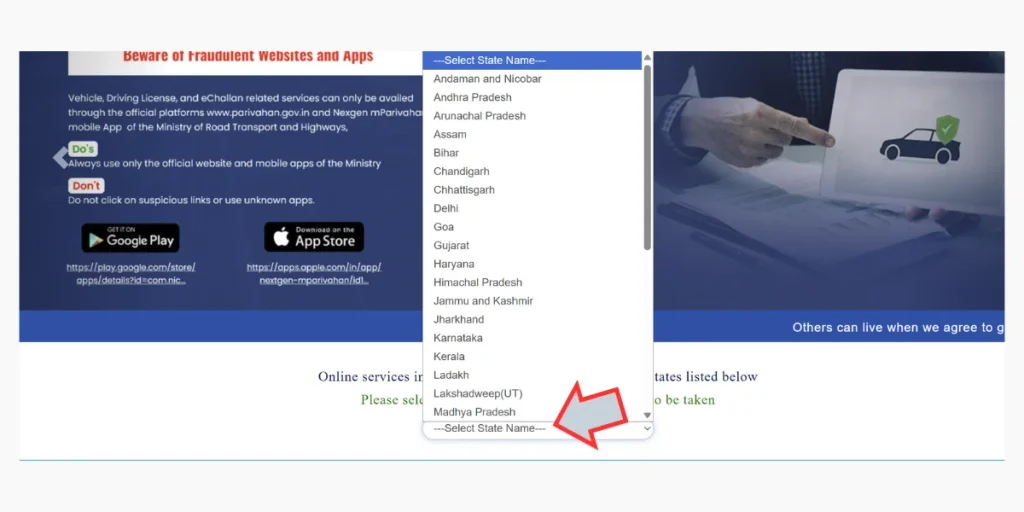
- Open the official Sarathi Parivahan https://sarathi.parivahan.gov.in/ website and select your state from the list.
- Choose the State where you submitted your Driving Licence application.
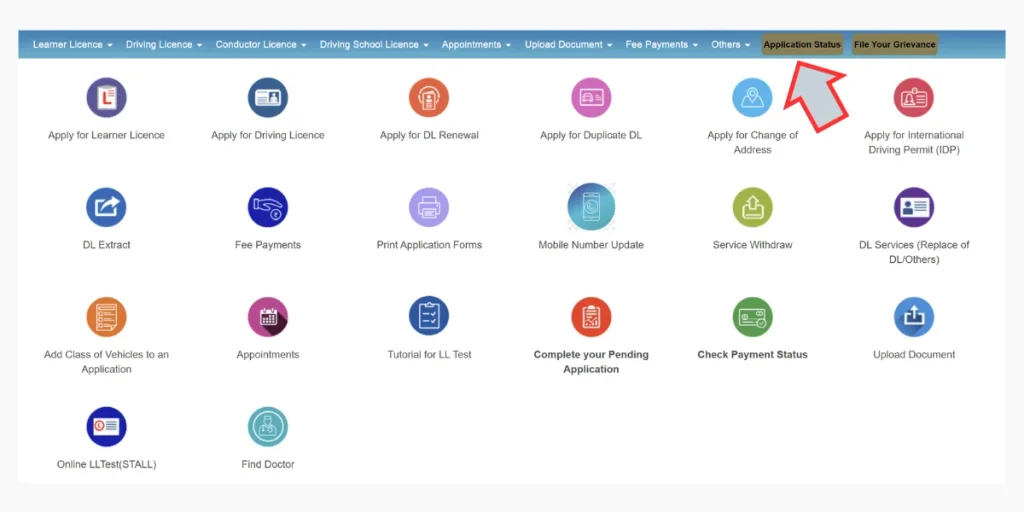
- After selecting your state, find and click the Application Status option available on the Sarathi portal.
- Enter your Application Number and other required details, such as your date of birth, if requested.
- Type the captcha code shown on the screen and submit the details.
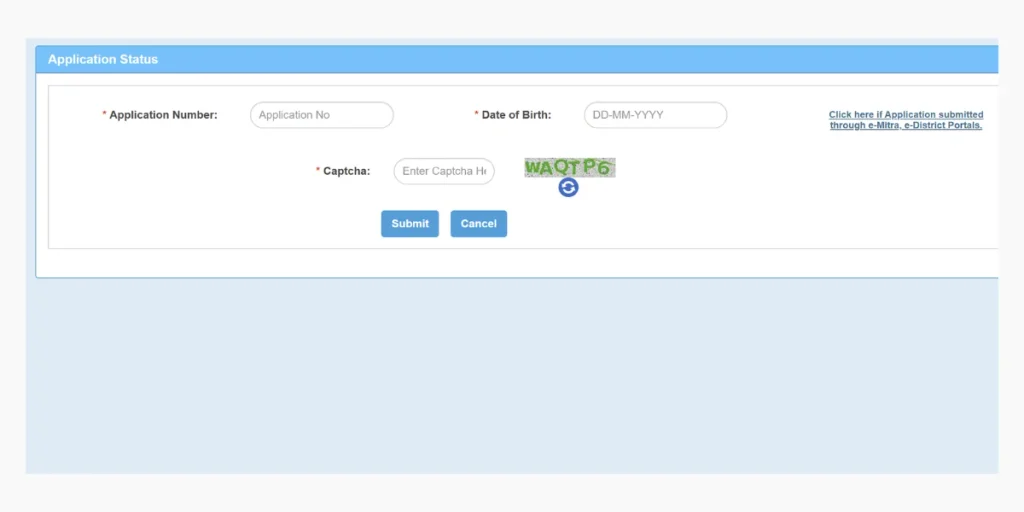
- Your application details and current DL Status will be displayed on the screen. You can check whether your application is still being processed or has moved to the next stage.
Tip: Keep your application number or acknowledgement receipt with you while checking the status. If the status has not been updated yet, you can check again later or contact the concerned RTO.
DL Application Status: What Does It Show?
The DL Application Status helps applicants understand what is happening with their licence application.
For example, an application may be waiting for document verification, a driving test, approval, printing, or another administrative process. The exact wording of the status depends on the service and the concerned RTO.
If your application does not immediately show the final licence information, it does not necessarily mean that your application has been rejected. In many cases, processing can take time because different stages are handled by the concerned transport authority.
Therefore, applicants should carefully read the status shown on the official portal instead of relying on unofficial websites or third-party information.
Driving Licence Status After the Driving Test
Many applicants check their Driving Licence Status after completing the driving test.
Once the required test and other formalities have been completed, the application may move to the next processing stage. The final update depends on the concerned licensing authority and the status of your application in the Sarathi system.
If your result or application information is not updated immediately, you can check again later through the official portal.
It is also useful to keep your application number and other submitted details safely available because they may be required when checking your application.
Common DL Status Messages
The exact status terminology can vary, but applicants may encounter different types of updates during the licence process.
Some statuses can indicate that:
- The application has been submitted.
- Documents or details are being processed.
- An appointment or test stage is pending.
- The driving test has been completed.
- The application is awaiting approval.
- The licence-related process has moved forward.
- Further action or correction may be required.
You should always consider the status in the context of the service you selected and the instructions displayed by the official portal.
Why Is My DL Status Not Updated?
Sometimes applicants check their status and find that there has been no recent update. This can happen for several reasons.
The application may still be under processing at the RTO, a document or test-related stage may not have been completed, or the latest information may not yet have been reflected online.
Another possibility is that the applicant is checking the wrong service or has entered incorrect application details.
If the information remains unchanged for an unusually long period, it is better to contact the concerned RTO or use the official support channels instead of repeatedly submitting a new application.
For technical problems related to Learner Licence and Driving Licence services, the Parivahan system lists the Sarathi helpdesk and phone support for licence-related issues.
DL Status vs Driving Licence Details
It is important to understand the difference between checking an application status and checking the details of an already issued licence.
DL Status generally refers to tracking the progress or processing of an application, while licence-related services may also allow users to access information about an existing Driving Licence.
The Sarathi system provides several licence services, including DL-related services, DL extract and other facilities.
If your licence has already been issued, you may not need to track the original application in the same way as someone who is still waiting for approval.
What Information Should You Keep Ready?
Before performing a DL Status Check, keep the following information available:
- Driving Licence application number
- Date of birth, wherever required
- State and RTO details
- Registered mobile number, if required
- Other information requested by the official portal
Make sure the information is entered exactly as provided during your application process.
Keeping the application acknowledgement or receipt can also be helpful if you need to contact the RTO about your application.
Is DL Status Check Available Online?
Yes, the Sarathi Parivahan system provides online application-status functionality as part of its driving licence services. The exact interface and services available can vary according to the selected state and RTO.
This online system saves applicants from having to visit an RTO simply to ask about the progress of an application. However, some cases may still require communication with or a visit to the concerned transport authority.
Important Tips for Checking DL Status
Always use the official Sarathi Parivahan portal when checking your application. Avoid websites or mobile applications that ask for unnecessary personal information, OTPs, passwords or payment details.
Also, do not submit multiple applications simply because your status has not changed immediately. First check the existing application carefully and, if necessary, contact the concerned RTO.
The official Parivahan ecosystem includes Sarathi for driving-licence services, while other services such as Vahan and e-Challan handle different transport-related functions.
Final Words
The online DL Status facility makes it easier for applicants to follow the progress of their Driving Licence application. Whether you have recently applied for a new licence, completed a driving test, requested a renewal, or used another DL-related service, the official Sarathi Parivahan system is the appropriate place to check available application information.
For a reliable DL Status Check, always select the correct state, enter your application details carefully and follow the instructions shown on the official government portal. If your DL Application Status remains unchanged or you face a technical problem, the concerned RTO or official Sarathi support channel can provide further assistance.
Frequently Asked Questions About DL Status
How can I check my DL Status online?
You can check it through the official Sarathi Parivahan portal by selecting your state and opening the Application Status service. Enter the required application details to view the available status information.
What is DL Application Status?
DL Application Status shows the current processing stage of your Driving Licence application. The information displayed depends on the service applied for and the concerned RTO.
How long does it take for Driving Licence Status to update?
There is no single processing time applicable to every application. Updates depend on the type of service, verification, test requirements, RTO processing and other administrative factors.
What should I do if my DL Status is not changing?
First verify that you are checking the correct application and entering the correct details. If the status remains unchanged for a significant period, contact the concerned RTO or the official Sarathi support system.
Can I check DL Status without visiting the RTO?
In many cases, yes. The Sarathi Parivahan portal provides online application-status services, allowing applicants to track available information without visiting the RTO just for a status enquiry.