RC Status is an online facility that helps vehicle owners check registration-related information and access different vehicle services in India. The Ministry of Road Transport and Highways (MoRTH) provides these services through the official Parivahan portal and its VAHAN system.
Whether you have purchased a second-hand vehicle, applied for a new Registration Certificate, or requested a duplicate RC, checking the status online can help you understand the progress of your application.
Instead of visiting the RTO for every small update, vehicle owners can use available online services to check application details, access vehicle records, and manage different RC-related services. Let’s understand how the process works and how you can use these facilities.
What Is RC Status?
RC stands for Registration Certificate, an important document that confirms the registration of a motor vehicle with the concerned Regional Transport Office (RTO). It contains essential information about the vehicle, such as its registration number, owner’s details, vehicle class, fuel type, and registration validity.
RC Status generally refers to checking the current details of a vehicle’s registration or tracking an application submitted for an RC Status-related service.
The Government of India provides vehicle registration facilities through the VAHAN system. Using the official Parivahan platform, users can access services such as RC particulars, ownership transfer, duplicate RC, and address changes. The available options may vary depending on the state and vehicle record.
How to Check RC Status Online?
Checking RC-related information online is convenient because you can access the available services from your home. Follow these general steps to reach the official vehicle services:
- Visit the official Parivahan website.
- Open the Online Services section.
- Select Vehicle Related Services.
- Enter your vehicle registration number.
- Select your state or RTO, if required.
- Click on Proceed to continue.
- Choose the relevant RC-related service.
- Enter the required vehicle and chassis details.
- Complete OTP verification if requested.
- Follow the instructions displayed on the screen.
Once the required verification is completed, you can access the information or service available for your vehicle.
Vehicle RC Details Available Online
The Parivahan and VAHAN platforms provide access to different vehicle registration services. Depending on the available record and verification requirements, users can check relevant vehicle RC details through the official system.
Some commonly available vehicle-related information includes:
- Vehicle registration number
- Registration date
- Vehicle class and category
- Fuel type
- Manufacturer and model
- Registration authority
- Registration validity
- Fitness-related information, where applicable
The information displayed may differ depending on the vehicle category and available government records. Some personal information may also be restricted for privacy and security reasons.
How to Check RC Application Status?
If you have recently applied for a duplicate RC, ownership transfer, or another vehicle registration service, you may want to know whether your application has been processed.
VAHAN provides status-related options for checking vehicle transactions and applications. To check a pending transaction, follow these steps:
- Open the VAHAN Portal– https://vahan.parivahan.gov.in/
- Select the Status option.
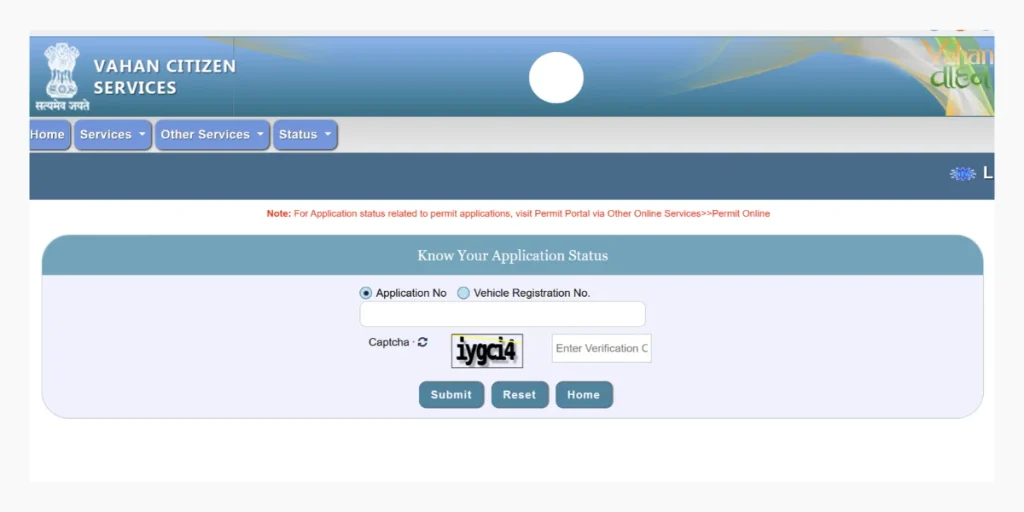
- Click on Check Pending Transaction.
- Enter your vehicle registration number.
- Provide the required chassis number details or transaction number.
- Click on Show Details.
- Check the transaction information displayed on the screen.
If your payment or application is still pending, follow the instructions provided by the portal to complete the required process.
RC PDF Download – How to Get a Digital RC?
Many vehicle owners search for RC PDF download when they need an electronic copy of their Registration Certificate. A digital RC can be useful when you are travelling, verifying vehicle information, or keeping important vehicle documents accessible on your mobile phone.
You can explore the official government-supported digital document facilities, such as DigiLocker and mParivahan, to access your available digital RC.
Follow these general steps:
- Open the official DigiLocker website or mobile application.
- Sign in using your registered account.
- Find the Transport or Vehicle Registration Certificate section.
- Select the relevant issuing authority.
- Enter the requested vehicle details.
- Complete the required verification.
- Access your RC document if it is available in the system.
Remember that document availability depends on the vehicle record and issuing authority. Always use an officially issued digital document rather than relying on an ordinary photograph or an unverified PDF.
Vahan RC Download Through the Official Portal
The term vahan RC download is commonly searched by people who want to access their vehicle registration document online.
The VAHAN system offers several RC-related facilities, including RC particulars and duplicate RC applications. However, checking vehicle information and downloading an official RC document are two different processes.
If your original RC is lost or damaged, you can explore the Issue of Duplicate RC service through the official VAHAN portal.
Generally, the process involves:
- Visiting the official VAHAN Citizen Services portal.
- Entering your vehicle registration number.
- Selecting the relevant RC service.
- Providing the required chassis details.
- Completing OTP verification.
- Filling in the requested application details.
- Paying the applicable fee, if required.
- Following the instructions for further processing.
Depending on your application and state, additional documents or an RTO visit may be required.
Other RC-Related Services Available on Parivahan
Apart from checking RC information, the VAHAN platform provides several useful services for vehicle owners. These facilities help people manage their vehicle registration requirements without visiting the RTO for every basic task.
Some important services include:
- Transfer of Ownership: Apply to transfer vehicle ownership after selling or purchasing a vehicle.
- Duplicate RC: Apply for a replacement Registration Certificate if the original document is lost or damaged.
- Change of Address: Request an update to the address recorded in the RC.
- Hypothecation Services: Apply for addition, continuation, or termination of hypothecation details.
- Vehicle NOC: Apply for a No Objection Certificate when required for moving a vehicle to another state.
- RC Particulars: Access the relevant registration certificate particulars through the official service.
The availability of these services depends on state implementation and vehicle eligibility.
Can I Check RC Status Without Visiting the RTO?
Yes, many RC-related services can be accessed online through the Parivahan portal. Users can submit applications, complete eligible payments, upload supporting documents, and check transaction information.
However, online processing does not mean that every application is completed without an RTO visit. Some services may require physical document verification, vehicle inspection, or additional approval from the concerned authority.
Therefore, always check the instructions displayed on the official portal before assuming that your application is fully completed.
Important Things to Remember While Checking RC Status
Before using any online vehicle registration service, keep a few important points in mind:
- Always use the official Parivahan or VAHAN website.
- Keep your vehicle registration number and chassis details ready.
- Use your registered mobile number for OTP verification.
- Do not share your OTP or personal information with unknown individuals.
- Check all vehicle details carefully before submitting an application.
- Save payment receipts and application numbers for future reference.
- Contact your concerned RTO if incorrect information appears in your vehicle record.
These simple precautions can help you use online vehicle services more safely and avoid unnecessary delays.
Conclusion
RC Status checking has made it easier for vehicle owners to access registration-related information and manage different vehicle services online. Through the official Parivahan and VAHAN platforms, users can explore vehicle records, track pending transactions, apply for duplicate RC, and access other registration facilities.